
How to load and configure IPTV on VU Player Pro on Fire TV Stick / Android Box / Sony TV
Important note: VU Player Pro is a paid application that provides a better streaming experience and optimal quality. Activation terms depend on the chosen subscription. Please read the information at the bottom of the page carefully before requesting a trial or activation.
1 : Move your mouse pointer over the “Home” option on your device’s home screen.
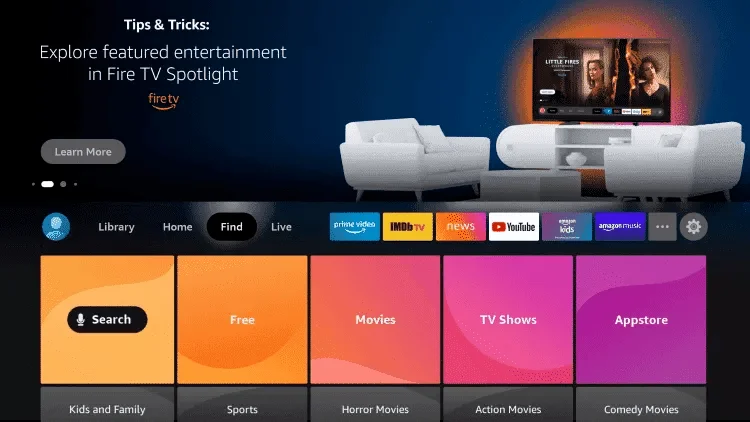
2 : Click on “Search”.

3 : Search for “Downloader” and select it.
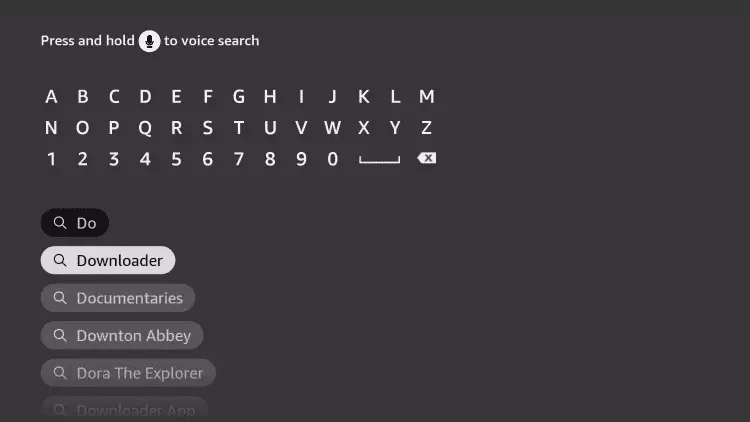
4 : Select the “Downloader” application.
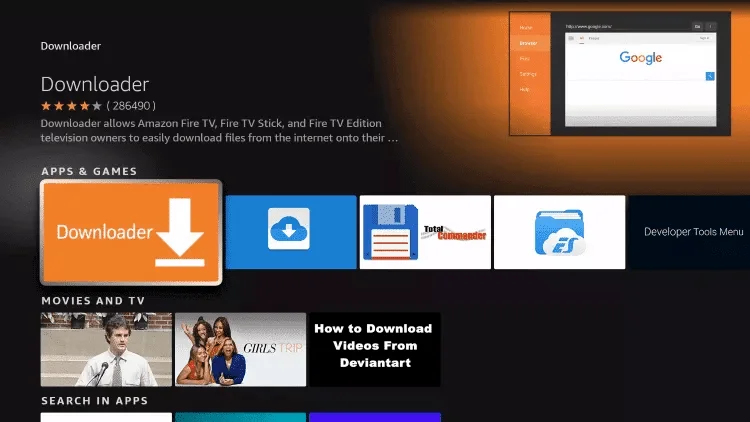
5 : Click on “Download”.
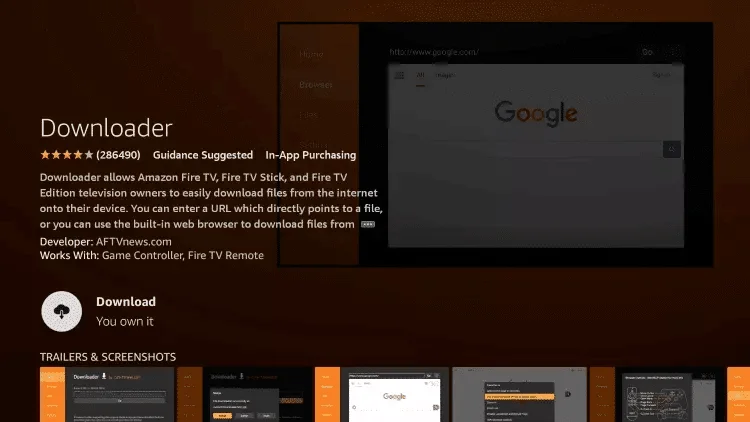
6 : Once the application installation is complete, click “Open”.
7 : Return to the home screen and open the “Settings”.
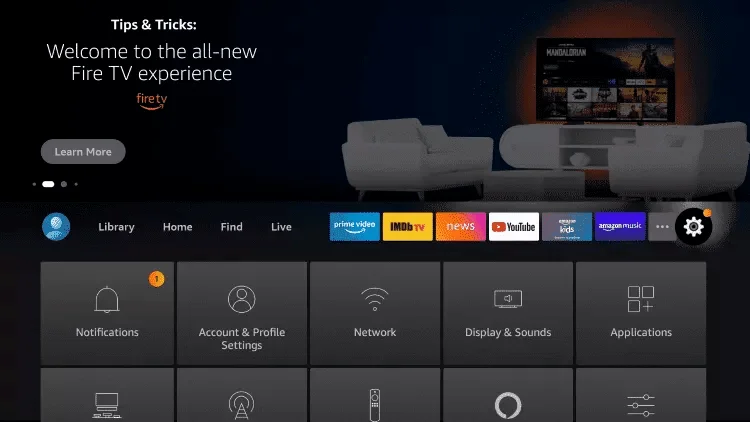
8 : Click on “My Fire TV”.
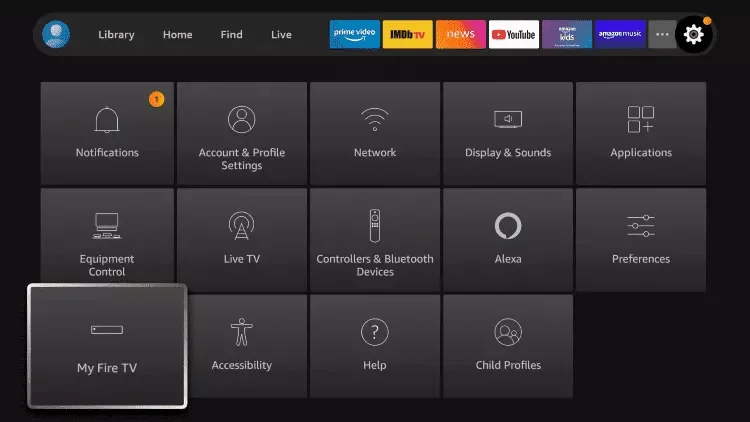
9 : Select the “Developer” option.
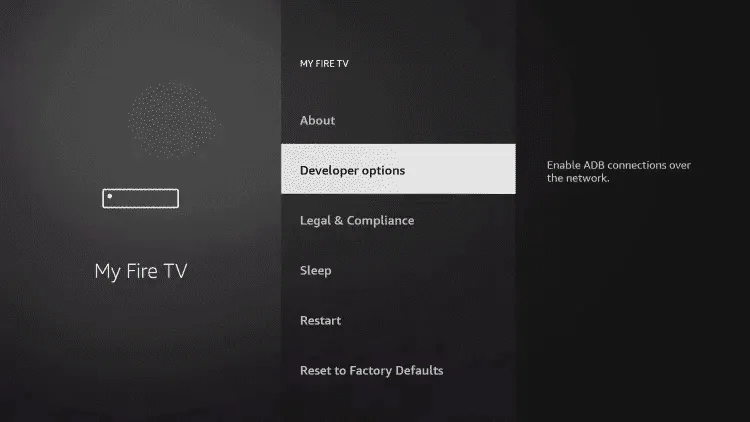
10 : Click on “Install Unknown Applications” .
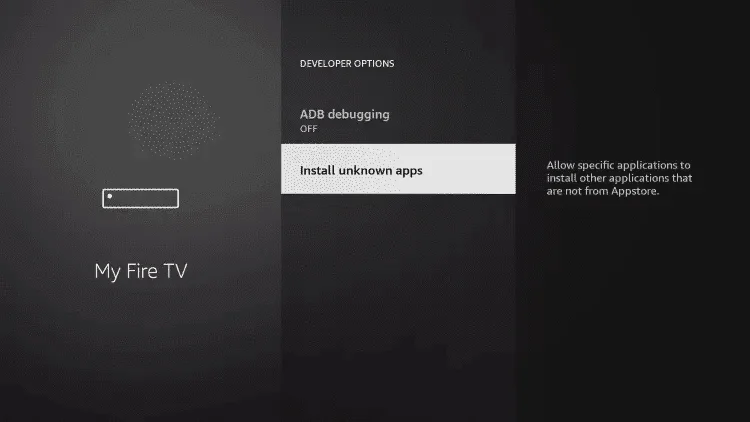
11 : Locate the “Downloader” application and click on it.
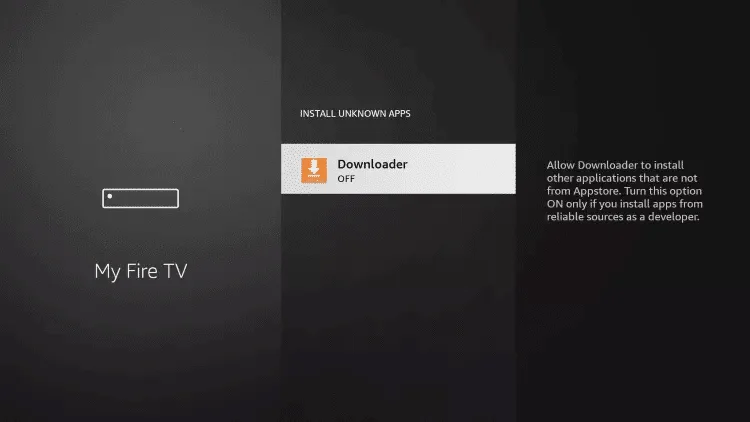
12 : This enables the “Unknown sources” option for the downloader application. This allows you to install apps from other sources on your device.
13 : Start the “Downloader” application.
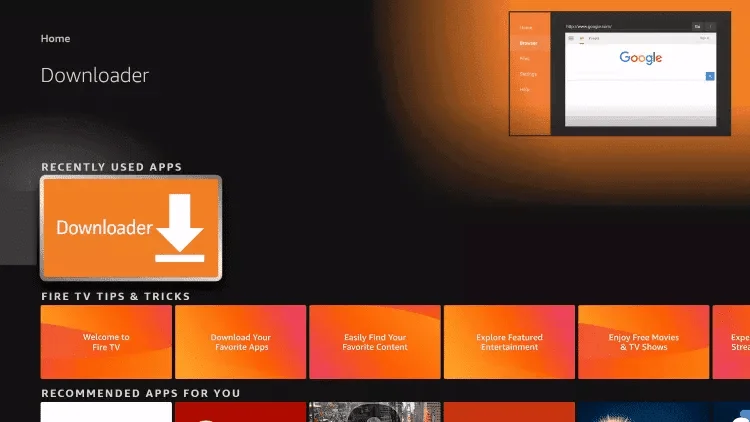
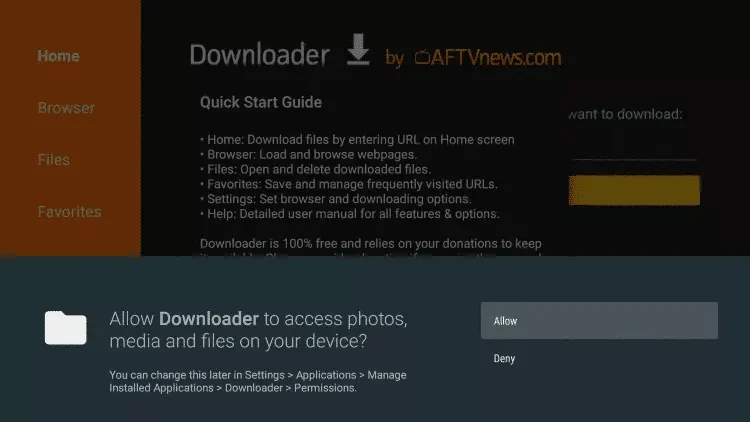
14 : Click on “Allow”.
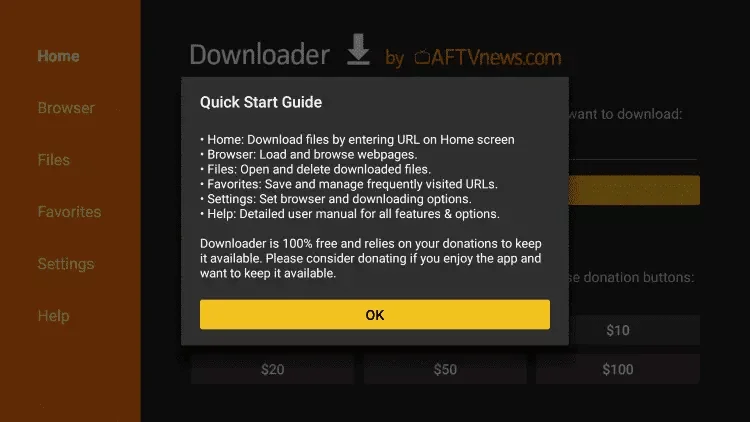
15 : Click “OK”.
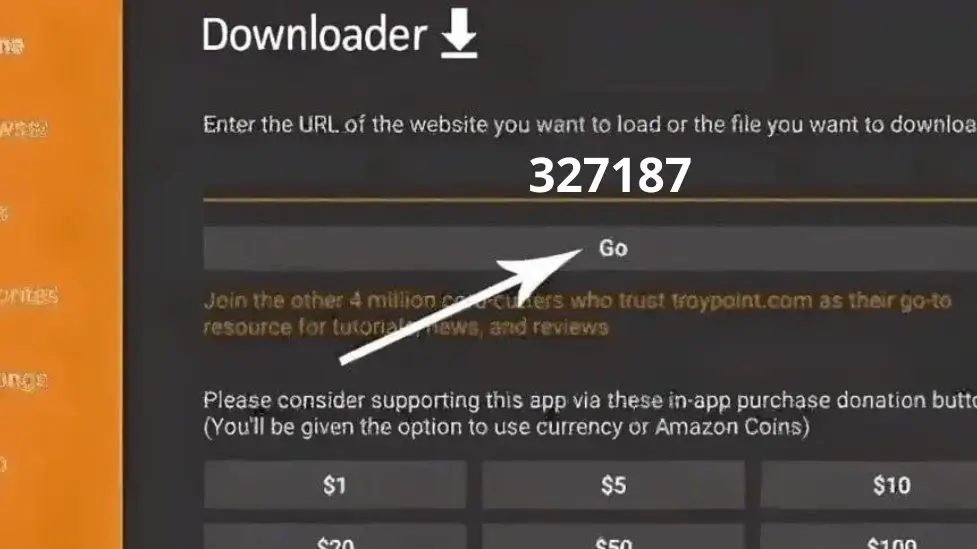
16 : Enter the following VU Player Pro shortcode exactly as it is shown here :
Shortcode : 327187
Or THE LINK : https://vuplayer.pro/vupro.apk
and click “Go” to download VU Player Pro :
17 : Wait until the file has downloaded.

18 : Click on “Install”.
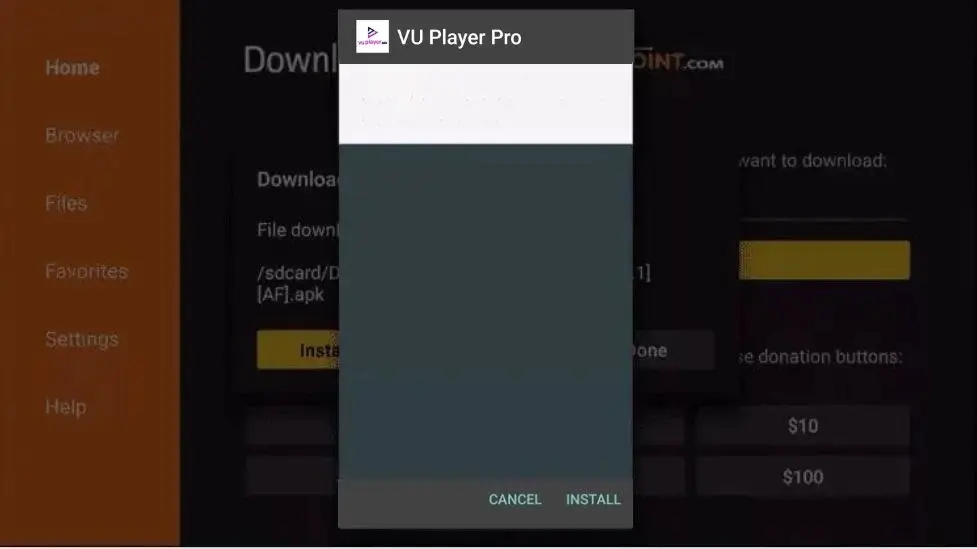
19 : Click on “Finish”.
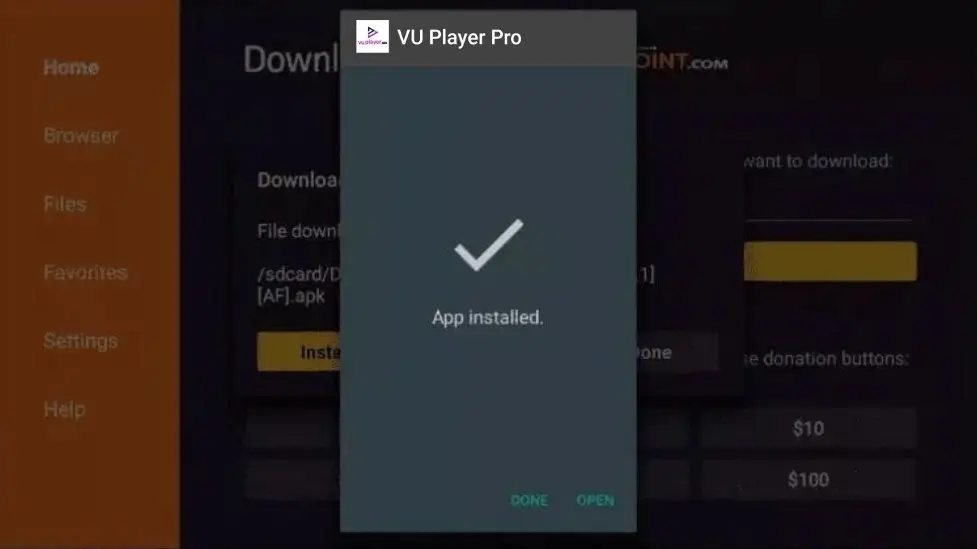
20 : Once the app is installed, simply contact us via WhatsApp to receive your free trial, activate the app, or purchase a full subscription. Our team will be happy to assist you with setting up your access so you can use all the programs immediately.
Important information regarding activation and testing
– VU Player Pro is a paid application.
– We use applications to ensure a smooth, stable and high-quality streaming experience.
– We accept no responsibility if you choose to use free applications instead of the paid applications IBO Player and VU Player PRO.
– VU Player Pro activation is only included in certain subscriptions. We recommend carefully reviewing the pricing table before purchasing to determine if app activation is included in your subscription. If activation is not included, you will need to purchase the app separately, or we can activate it for you for an additional fee.
– You can choose the application that suits you best (VU Player Pro or IBO Player). After the trial period, your choice is final and cannot be changed. However, you can try both applications before making your final decision.
How to download and configure IPTV on IBO Player on Fire TV Stick / Android Box / Sony TV
Important note: IBO Player is a paid application that provides a better streaming experience and optimal quality. Activation terms depend on the chosen subscription. Please read the information at the bottom of the page carefully before requesting a trial or activation.
1 : Move your mouse pointer over the “Home” option on your device’s home screen.
2 : Click on “Search”.
3 : Search for “Downloader” and select it.
4 : Select the “Downloader” application.
5 : Click on “Download”.
6 : Once the application installation is complete, click “Open”.
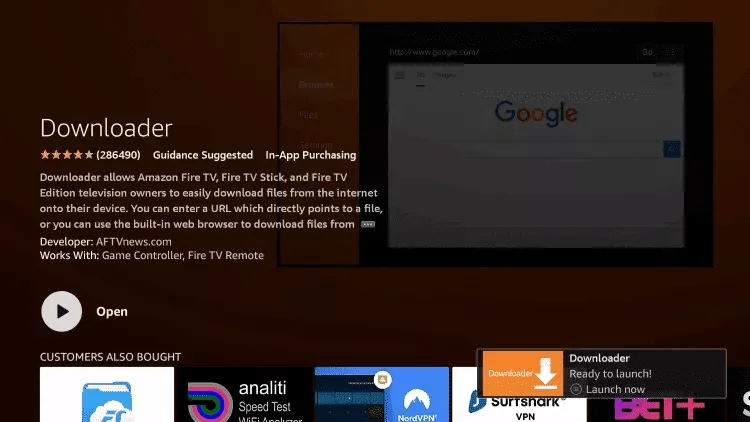
7 : Return to the home screen and open the “Settings”.
8 : Click on “My Fire TV”.
9 : Select the “Developer” option.
10 : Click on “Install Unknown Applications”.
11 : Locate the “Downloader” application and click on it.
12 : This enables the “Unknown sources” option for the downloader application. This allows you to install apps from other sources on your device.
13 : Start the “Downloader” application.
14 : Click on “Allow”.
15 : Click “OK”.
16 : Enter the following IBO Player shortcode exactly as it appears here.
Shortcode : 511693
Or THE LINK : http://aftv.news/511693
and click “Go” to download IBO Player :
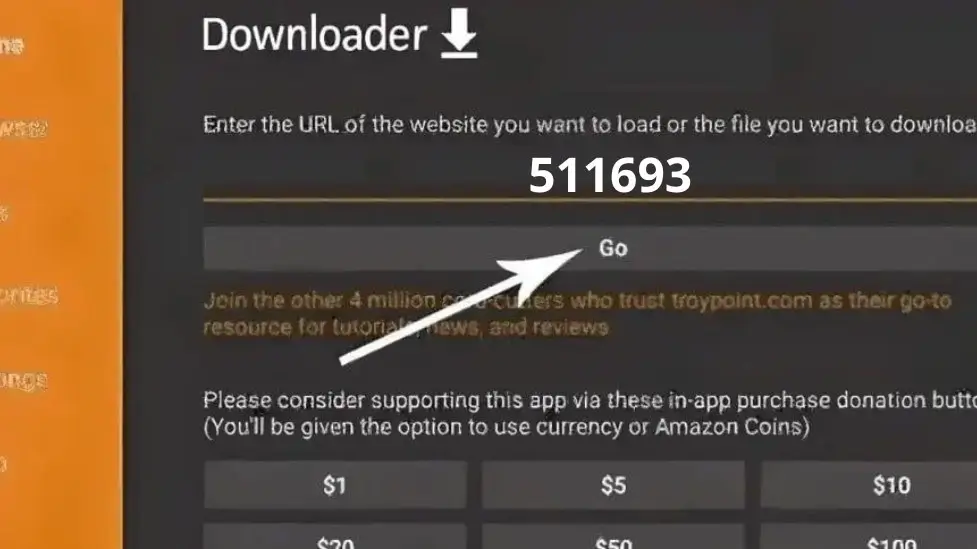
17 : Wait until the file has downloaded.
18 : Click on “Install”.
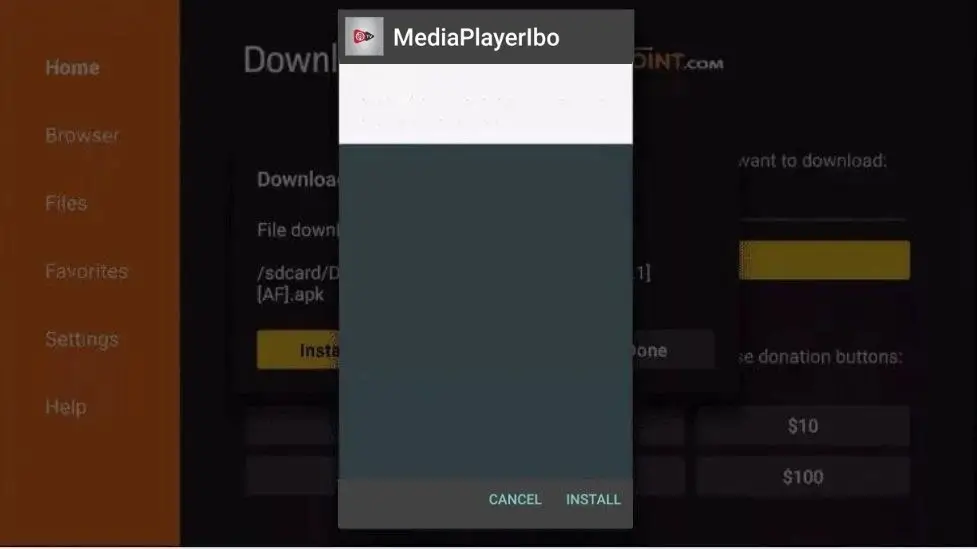
19 : Click on “Finish”.
20 : Once the app is installed, simply contact us via WhatsApp to receive your free trial, activate the app, or purchase a full subscription. Our team will be happy to assist you with setting up your access so you can use all the programs immediately.
Important information regarding activation and testing
– IBO Player is a paid application.
– We use applications to ensure a smooth, stable and high-quality streaming experience.
– We accept no responsibility if you choose to use free applications instead of the paid applications IBO Player and VU Player PRO.
– IBO Player activation is only included in certain subscriptions. We recommend carefully reviewing the pricing table before purchasing to determine if app activation is included in your subscription. If activation is not included, you will need to purchase the app separately, or we can activate it for you for an additional fee.
– You can choose the application that suits you best (VU Player Pro or IBO Player). After the trial period, your choice is final and cannot be changed. However, you can try both applications before making your final decision.
How to load and configure IPTV on VU Player Pro on WINDOWS
Important note: VU Player Pro is a paid application that provides a better streaming experience and optimal quality. Activation terms depend on the chosen subscription. Please read the information at the bottom of the page carefully before requesting a trial or activation.
1 : Click Download or use the link above to download VU Player Pro for Windows:
https://vuplayer.pro/vuplayerpro.exe
2 : Once the download is complete, open the installation file.
3 : Follow the on-screen instructions to install VU Player Pro on your computer.
4 : Once the installation is complete, launch the VU Player Pro application.
5 : Once the app is installed, simply contact us via WhatsApp to receive your free trial, activate the app, or purchase a full subscription. Our team will be happy to assist you with setting up your access so you can use all the programs immediately.
How to load and configure IPTV on IBO Player on WINDOWS
Important note: IBO Player is a paid application selected for a better streaming experience, optimal stability, and high image quality. Activation terms depend on the chosen subscription. Please read the information at the bottom of the page carefully before requesting a trial or activation.
1 : Click Download or use the link above to download IBO Player for Windows:
https://iboiptv.com/app_downloads/ibo_installer.exe
2 : Once the download is complete, open the installation file.
3 : Follow the on-screen instructions to install IBO Player on your computer.
4 : Once the installation is complete, launch the IBO Player application.
5 : Once the app is installed, simply contact us via WhatsApp to receive your free trial, activate the app, or purchase a full subscription. Our team will be happy to assist you with setting up your access so you can use all the programs immediately.
Important information regarding activation and testing
– IBO Player and VU Player Pro are both paid applications.
– We use these applications to guarantee an experience of smooth, stable and high quality streaming.
– We accept no responsibility if you choose to use free applications instead of the paid applications IBO Player and VU Player PRO.
– Activation of VU Player Pro and IBO Player is only included in certain subscription plans. Please check the price list carefully before purchasing. If activation is not included, you will need to purchase the app separately, or we can activate it for an additional fee.
– You can choose the application that suits you best (VU Player Pro or IBO Player). After the trial period, your choice is final and cannot be changed. However, you can try both applications before making your final decision.
How to load and configure IPTV on IBO Player on MacOS
Important Notice: IBO Player is a paid application chosen for a better streaming experience, optimal stability, and high image quality. Activation conditions depend on the selected subscription. Please carefully read the information at the bottom of the page before requesting a trial or activation.
1 : Click Download or use the link above to download IBO Player for MacOS:
https://iboiptv.com/app_downloads/iboPlayer.dmg
2 : Once the download is complete, open the installation file.
3 : Follow the on-screen instructions to install IBO Player on your MacOS.
4 : Once the installation is complete, launch the IBO Player application.
5 : Once the app is installed, simply contact us via WhatsApp to receive your free trial, activate the app, or purchase a full subscription. Our team will be happy to assist you with setting up your access so you can use all the programs immediately.
Important information regarding activation and testing
– IBO Player is a paid application.
– We use applications to ensure a smooth, stable and high-quality streaming experience.
– We accept no responsibility if you choose to use free applications instead of the paid applications IBO Player and VU Player PRO.
– IBO Player activation is only included in certain subscriptions. We recommend carefully reviewing the pricing table before purchasing to determine if app activation is included in your subscription. If activation is not included, you will need to purchase the app separately, or we can activate it for you for an additional fee.
How to load and configure IPTV on VU Player Pro on iPhone / iPad / Apple TV
Important Notice: VU Player Pro is a paid application selected for a better streaming experience, optimal stability, and high image quality. Activation conditions depend on the chosen subscription. Please carefully read the information at the bottom of the page before requesting a trial or activation.
1 : Click Download or use the link above to download VU Player Pro for iPhone / iPad / Apple TV:
https://apps.apple.com/us/app/vu-player-pro/id6449420114
Alternatively, you can open the App Store, search for “VU Player Pro” and then select the appropriate application.
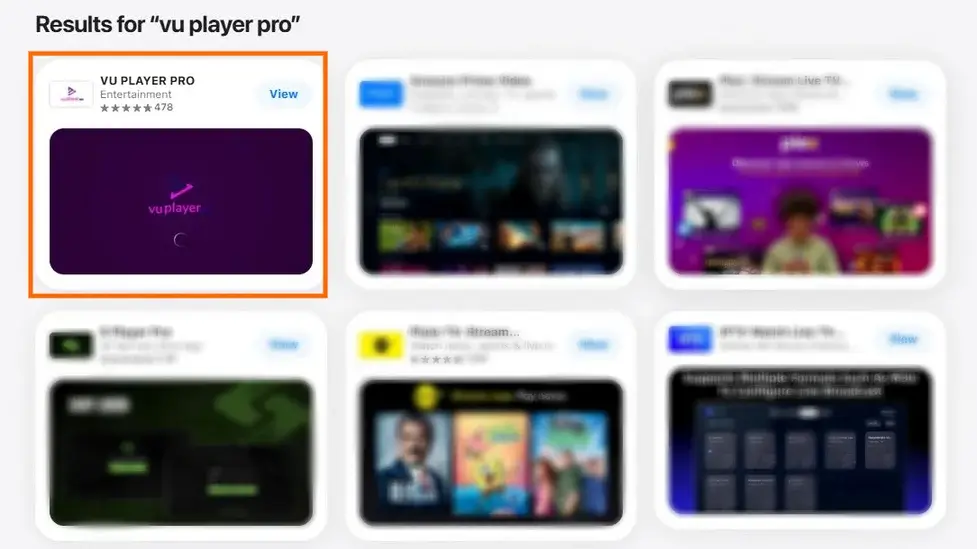
2 : Open the VU Player Pro applicatio.

3 : Then follow the displayed instructions to correctly install the software on your device.
4 : Once the installation is complete, launch the VU Player Pro application on your iPhone / iPad / Apple TV.
5 – Once the app is installed, simply contact us via WhatsApp to receive your free trial, activate the app, or purchase a full subscription. Our team will be happy to assist you with setting up your access so you can use all the programs immediately.
Important information regarding activation and testing
– VU Player Pro is a paid application.
– We use applications to ensure a smooth, stable and high-quality streaming experience.
– We accept no responsibility if you choose to use free applications instead of the paid applications IBO Player and VU Player PRO.
– VU Player Pro activation is only included in certain subscription packages. We recommend carefully reviewing the price list before purchasing to determine if app activation is included in your subscription. If activation is not included, you will need to purchase the app separately. Alternatively, we can activate it for you for an additional fee.
How to load and configure IPTV on IBO Player on LG TV
Important Notice: IBO PLAYER is a paid application chosen for a better streaming experience, optimal stability, and high image quality. Activation terms depend on the selected subscription. Please carefully read the information at the bottom of the page before requesting a trial or activation..
1 : Open the LG Content Store, search for “IBO Player” and then select the appropriate application.
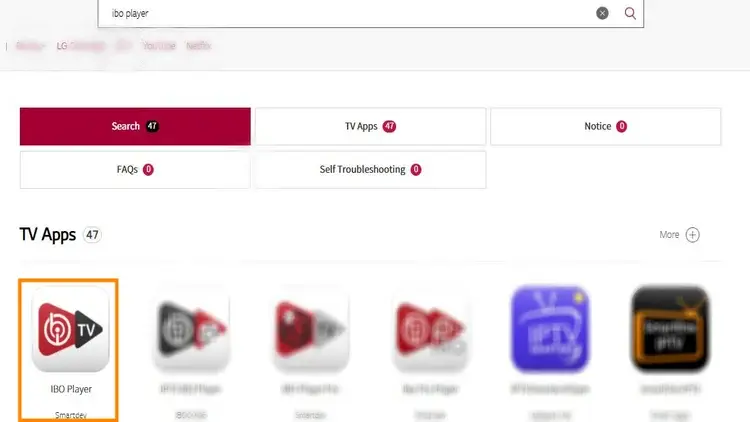
2 : Open the IBO Player application
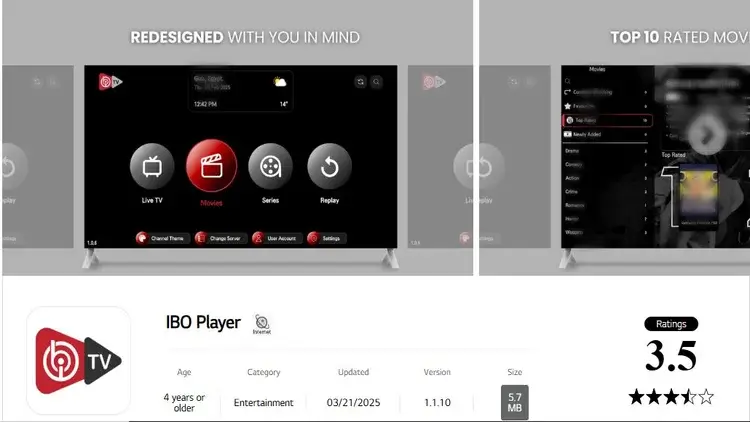
3 : Then follow the displayed instructions to correctly install the software on your device.
4 : Once the installation is complete, launch the IBO Player application on your LG TV.
5 : Once the app is installed, simply contact us via WhatsApp to receive your free trial, activate the app, or purchase a full subscription. Our team will be happy to assist you with setting up your access so you can use all the programs immediately.
Important information regarding activation and testing
– IBO Player is a paid application.
– We use applications to ensure a smooth, stable and high-quality streaming experience.
– We accept no responsibility if you choose to use free applications instead of the paid applications IBO Player and VU Player PRO.
– IBO Player activation is only included in certain subscriptions. We recommend carefully reviewing the pricing table before purchasing to determine if app activation is included in your subscription. If activation is not included, you will need to purchase the app separately, or we can activate it for you for an additional fee.
– You can choose the application that suits you best (VU Player Pro or IBO Player). After the trial period, your choice is final and cannot be changed. However, you can try both applications before making your final decision.
How to load and configure IPTV on VU Player Pro on LG TV
Important Notice: VU PLAYER PRO is a paid application selected for a better streaming experience, optimal stability, and high image quality. Activation terms depend on the chosen subscription. Please carefully read the information at the bottom of the page before requesting a trial or activation.
1 : Open the LG Content Store, search for “VU Player Pro” and then select the appropriate application.
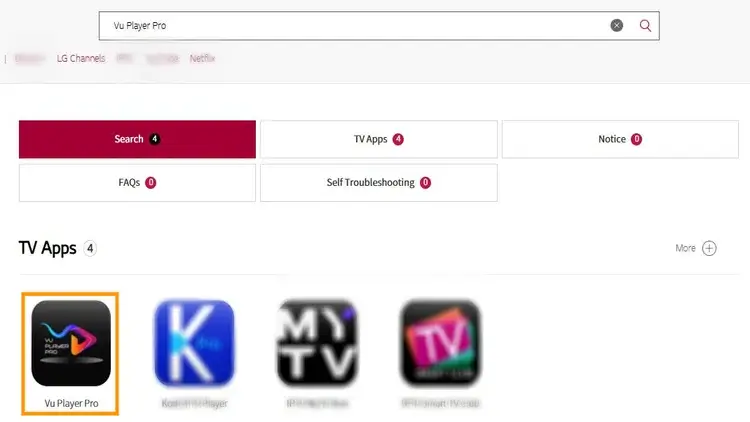
Open the VU Player Pro application.
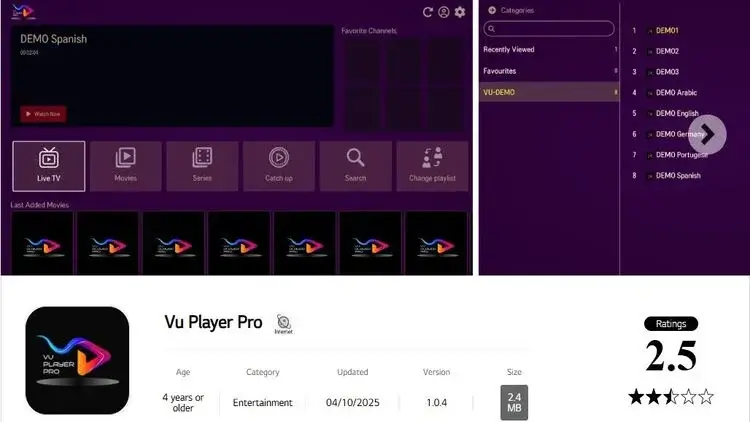
3 : Then follow the displayed instructions to correctly install the software on your device.
4 : Once the installation is complete, launch the VU Player Pro application on your LG TV.
5 : Once the app is installed, simply contact us via WhatsApp to receive your free trial, activate the app, or purchase a full subscription. Our team will be happy to assist you with setting up your access so you can use all the programs immediately.
Important information regarding activation and testing
– VU Player Pro is a paid application.
– We use applications to ensure a smooth, stable and high-quality streaming experience.
– We accept no responsibility if you choose to use free applications instead of the paid applications IBO Player and VU Player PRO.
– VU Player Pro activation is only included in certain subscriptions. We recommend carefully reviewing the pricing table before purchasing to determine if app activation is included in your subscription. If activation is not included, you will need to purchase the app separately, or we can activate it for you for an additional fee.
– You can choose the application that suits you best (VU Player Pro or IBO Player). After the trial period, your choice is final and cannot be changed. However, you can try both applications before making your final decision.
Here’s how to download and configure IBO PLAYER on your SAMSUNG TV
Important Notice: IBO PLAYER is a paid application chosen for a better streaming experience, optimal stability, and high image quality. Activation terms depend on the selected subscription. Please carefully read the information at the bottom of the page before requesting a trial or activation.
1 : Press the Home button (house icon) on your Samsung remote control to access the menu bar at the bottom of the screen.
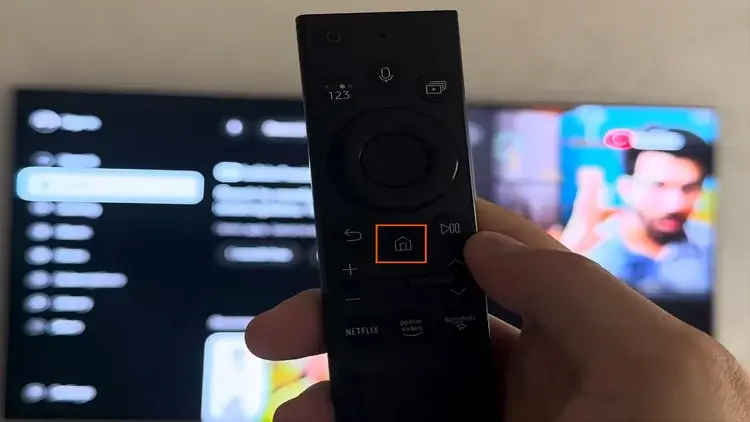
2 : Navigate to the left in the menu and select the “Apps” icon to access the Samsung App Store.
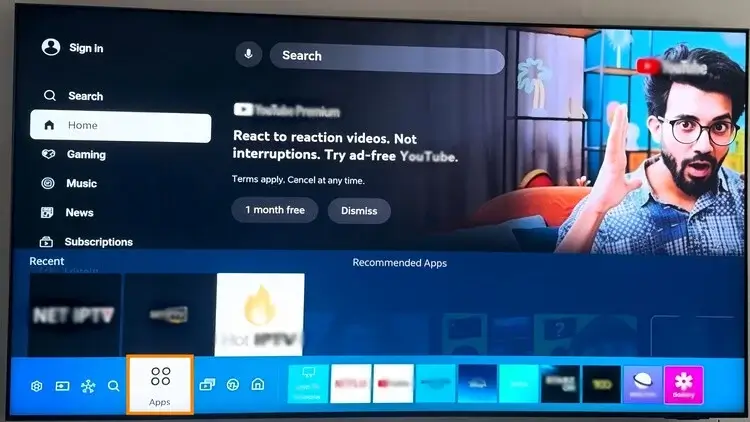
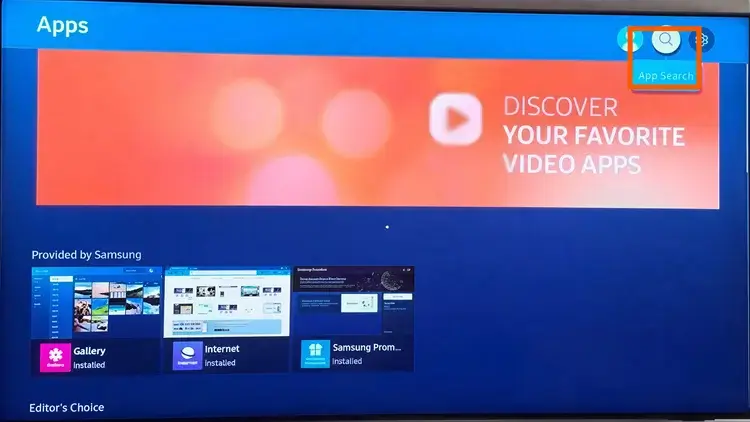
3 : Click on the search icon (the magnifying glass) in the upper right corner of the shop screen.
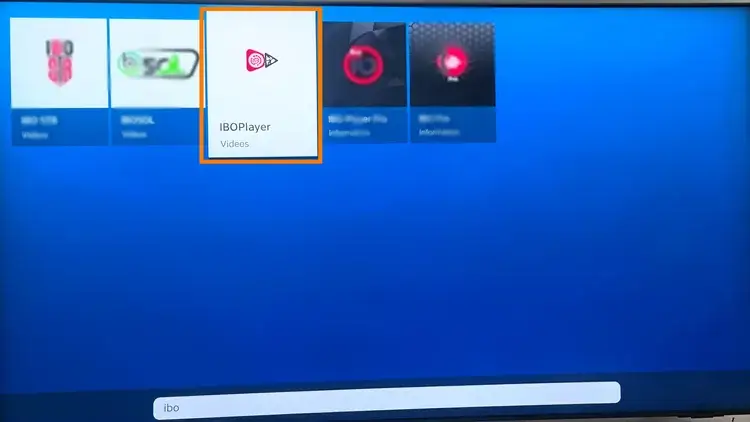
4 : Type “IBO Player” using the virtual keyboard and then select the appropriate application that appears in the search results.
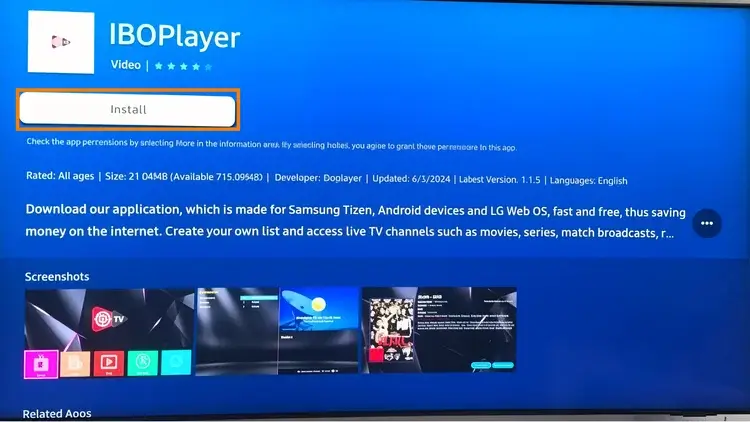
5 : Click the “Install” button. The download and installation will start automatically.
6 : Once the installation is complete, select the “Open” button to launch the IBO Player on your TV.
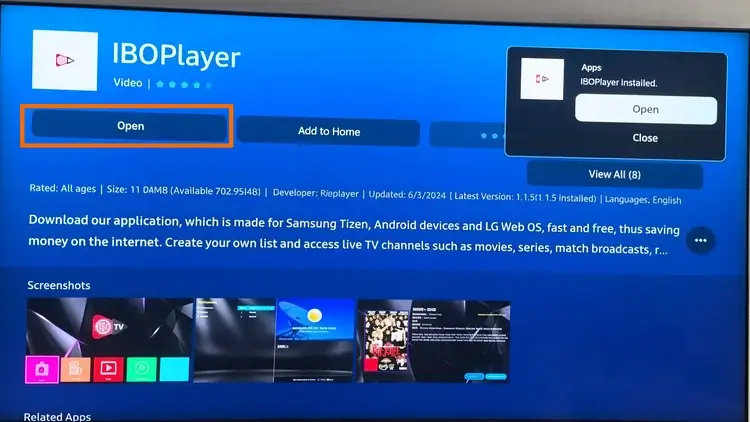
7 : Once the app is installed, simply contact us via WhatsApp to receive your free trial, activate the app, or purchase a full subscription. Our team will be happy to assist you with setting up your access so you can use all the programs immediately.
Important information regarding activation and testing
– IBO Player is a paid application.
– We use applications to ensure a smooth, stable and high-quality streaming experience.
– We accept no responsibility if you choose to use free applications instead of the paid applications IBO Player and VU Player PRO.
– IBO Player activation is only included in certain subscriptions. We recommend carefully reviewing the pricing table before purchasing to determine if app activation is included in your subscription. If activation is not included, you will need to purchase the app separately, or we can activate it for you for an additional fee.
Here’s how to download and configure VU Player Pro on a smartphone/tablet.
Important Notice: VU PLAYER PRO is a paid application selected for a better streaming experience, optimal stability, and high image quality. Activation terms depend on the chosen subscription. Please carefully read the information at the bottom of the page before requesting a trial or activation.
1 : Click Download or use the link above to download VU Player Pro for Windows:
https://vuplayer.pro/vupro.apk
2 : Once the download is complete, open the installation file.
3 : Follow the on-screen instructions to install VU Player Pro on your smartphone/tablet.
4 : Once the installation is complete, launch the VU Player Pro application.
5 : Once the app is installed, simply contact us via WhatsApp to receive your free trial, activate the app, or purchase a full subscription. Our team will be happy to assist you with setting up your access so you can use all the programs immediately.
Important information regarding activation and testing
– VU Player Pro is a paid application.
– We use applications to ensure a smooth, stable and high-quality streaming experience.
– We accept no responsibility if you choose to use free applications instead of the paid applications IBO Player and VU Player PRO.
– VU Player Pro activation is only included in certain subscriptions. We recommend carefully reviewing the pricing table before purchasing to determine if app activation is included in your subscription. If activation is not included, you will need to purchase the app separately, or we can activate it for you for an additional fee.
– You can choose the application that suits you best (VU Player Pro or IBO Player). After the trial period, your choice is final and cannot be changed. However, you can try both applications before making your final decision.
Here’s how to download and configure the IBO Player on a smartphone/tablet.
Important Notice: IBO PLAYER is a paid application chosen for a better streaming experience, optimal stability, and high image quality. Activation terms depend on the selected subscription. Please carefully read the information at the bottom of the page before requesting a trial or activation.
1 : Click Download or use the link above to download IBO Player for Windows:
https://iboiptv.com/app_downloads/ibop.apk
2 : Once the download is complete, open the installation file.
3 : Follow the on-screen instructions to install IBO Player on your SMARTPHONE / TABLET.
4 : Once the installation is complete, launch the IBO Player application.
5 : Once the app is installed, simply contact us via WhatsApp to receive your free trial, activate the app, or purchase a full subscription. Our team will be happy to assist you with setting up your access so you can use all the programs immediately.
Important information regarding activation and testing
– IBO Player is a paid application.
– We use applications to ensure a smooth, stable and high-quality streaming experience.
– We accept no responsibility if you choose to use free applications instead of the paid applications IBO Player and VU Player PRO.
– IBO Player activation is only included in certain subscriptions. We recommend carefully reviewing the pricing table before purchasing to determine if app activation is included in your subscription. If activation is not included, you will need to purchase the app separately, or we can activate it for you for an additional fee.
– You can choose the application that suits you best (VU Player Pro or IBO Player). After the trial period, your choice is final and cannot be changed. However, you can try both applications before making your final decision.
Here’s how to download and set up VU PLAYER PRO on ROKU TV
Important Notice: VU PLAYER PRO is a paid application selected for a better streaming experience, optimal stability, and high image quality. Activation terms depend on the chosen subscription. Please carefully read the information at the bottom of the page before requesting a trial or activation.
1 : On your Roku home screen, open the search bar and type “VU Player Pro”.
2 : Click on the VU Player Pro application icon in the search results to view the details.

3 : Click the “+Add App” button to download and install the channel on your Roku device.

4 : Once the app is installed, simply contact us via WhatsApp to receive your free trial, activate the app, or purchase a full subscription. Our team will be happy to assist you with setting up your access so you can use all the programs immediately.
Wichtiger Hinweis zur Aktivierung und zum Testen
Important information regarding activation and testing
– VU Player Pro is a paid application.
– We use applications to ensure a smooth, stable and high-quality streaming experience.
– We accept no responsibility if you choose to use free applications instead of the paid applications IBO Player and VU Player PRO.
– VU Player Pro activation is only included in certain subscriptions. We recommend carefully reviewing the pricing table before purchasing to determine if app activation is included in your subscription. If activation is not included, you will need to purchase the app separately, or we can activate it for you for an additional fee.